
 Anata Intelligence
 Shipping OS
Social Commerce
How to Give Anata Access to TikTok Ads and Shop
By Anata Inc. ·
Reviewed by Anata Inc. ·
TikTok steps follow current Business Center help and US Seller Center Academy documentation researched on November 12, 2026. The diagrams are original illustrations, not product screenshots.
The short answer.
TikTok Ads and TikTok Shop are separate accounts. To give Anata working access, send two invitations, each to the email your Anata account manager gives you for that account. For advertising, a Business Center Admin signs in at business.tiktok.com, opens Users, clicks Add Members, and invites that email as a Standard member. In Grant access, assign this brand's ad account and set the permission to Operator so Anata can create and edit ads. Leave Finance Manager and Financial Analyst set to None unless your manager asks for billing access.
For the shop, the shop owner signs in to Seller Center, goes to My Account, Account Settings, User Management, clicks Create New, chooses a role, and invites the Shop email. The invited Shop user must activate the email within 120 hours. Do not swap the two addresses. Inviting Anata as a member or sub-account is not the same as connecting TikTok inside Anata Intelligence.
Section 01
Use two invites and two emails
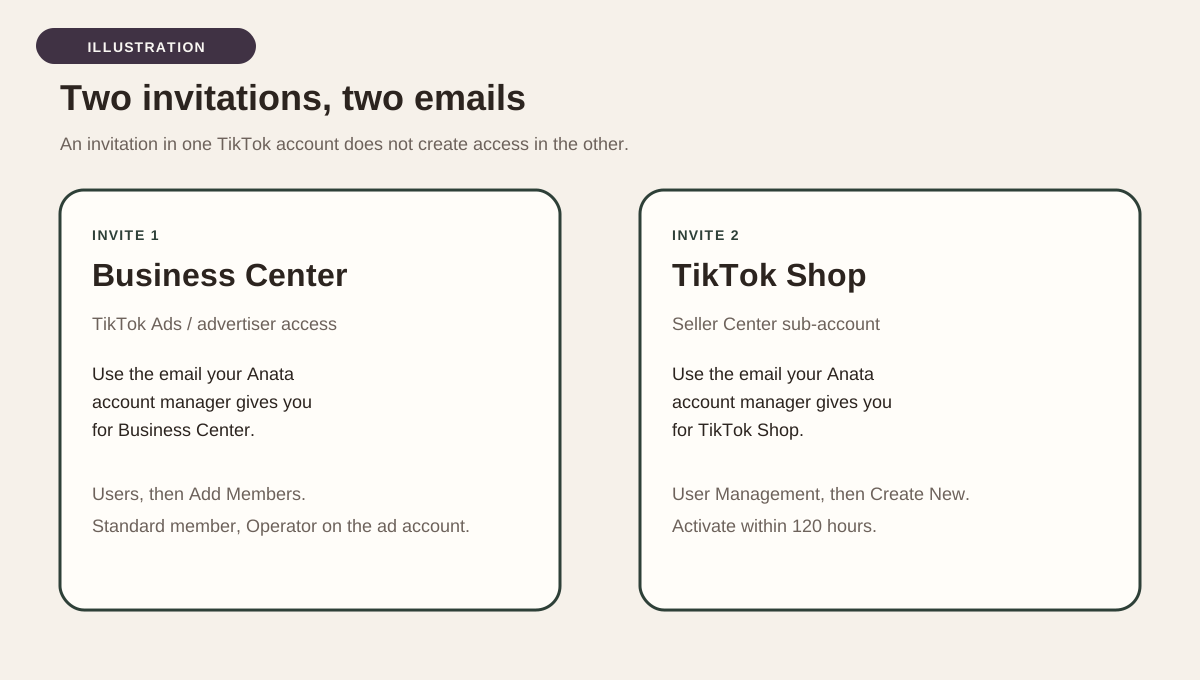
Anata needs access to two different TikTok surfaces, and TikTok keeps them separate. TikTok Business Center is where you manage advertising accounts, members, and partners. TikTok Shop Seller Center is where you manage the shop itself. An invitation in one place does not create access in the other. Complete both unless your account manager tells you that only one of the two is needed for this engagement.
Use the email your Anata account manager gives you for each account. For example, your manager may send one address for Business Center and advertising access, and a different address for TikTok Shop. Enter each address only in the account it belongs to. If you put the Shop email into Business Center, or the Business Center email into Seller Center, Anata will not get the access you intended. Do not share your owner password. TikTok lets you grant access by invitation.
Section 02
Invite Anata to Business Center by email
This is the usual path when your account manager asks you to grant access by email. Members are people you invite into your Business Center. Partners are other Business Centers, added with a Business Center ID or an ad account ID. Use the member path unless Anata has given you a Business Center ID and asked you to add a partner instead.
You must be a Business Center Admin to add a member. TikTok's roles article says only an Admin can add or remove members and invite or remove partners. A Standard member cannot send this invitation. If Users does not offer Add Members, ask the person who owns the Business Center to complete the steps, or to raise your role to Admin first.
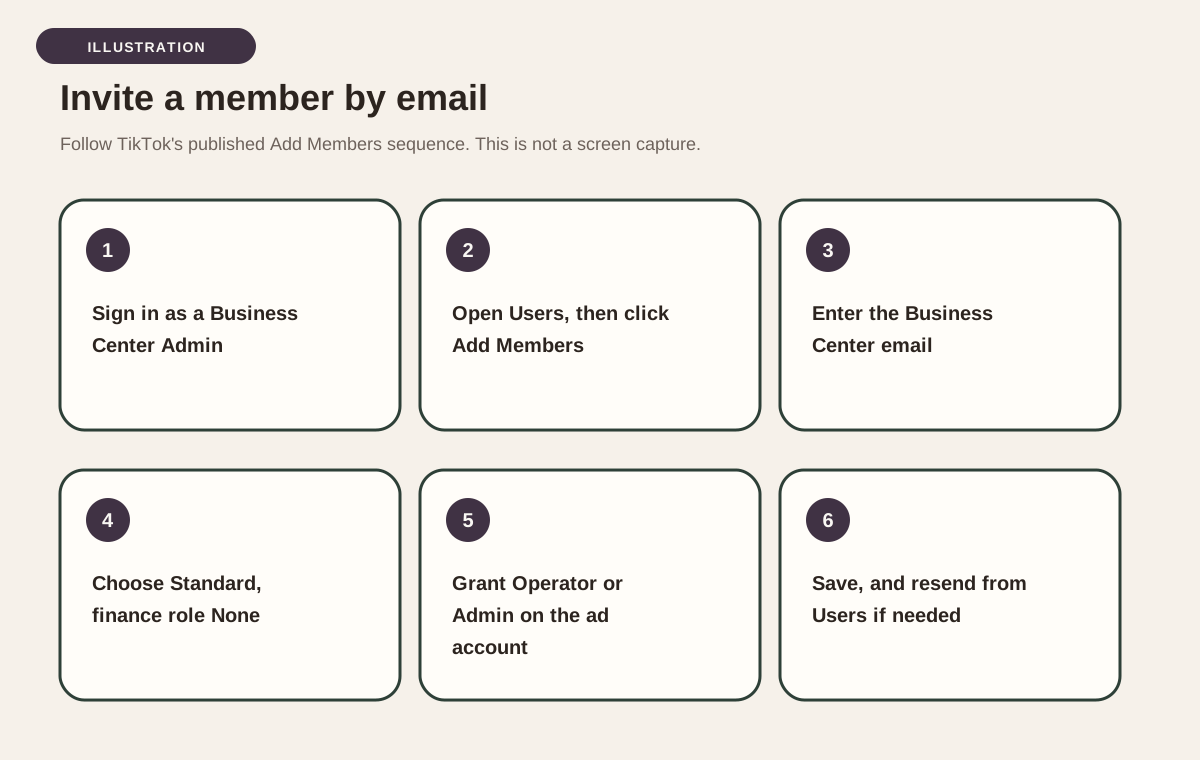
Sign in to TikTok Business Center at business.tiktok.com. In the left-hand menu, click Users, then click Add Members. In the Email Address section, enter the Business Center email your Anata account manager gave you. Confirm the email address and the name TikTok shows for that member. Choose the Standard role. Leave the finance role at None unless your manager has asked Anata to handle billing and payments. Click Next.
In the Grant access section, select this brand's advertiser or ad account. Set the ad account access level to Operator if you want Anata to create and edit ads and manage audiences. Choose Admin on the ad account if you also want Anata to manage ad account settings. Do not choose Analyst if the goal is advertising work, because Analyst cannot create or edit ads. You can also set optional data permissions on this screen. Click Save. TikTok may ask you to verify your identity. TikTok then sends an invitation to the email you entered. If Anata does not receive it, open the Users tab, click that email, and click Resend request.
- You are signed in as a Business Center Admin.
- You opened Users, then Add Members.
- You entered the Business Center email from your Anata account manager, not the Shop email.
- The Business Center role is Standard, unless your manager asked for Admin on the Business Center itself.
- Finance Manager and Financial Analyst are set to None, unless your manager asked for billing access.
- This brand's ad account is included in Grant access, with Operator or Admin permission.
- You clicked Save, and you can resend the request from the Users tab if the email does not arrive.
Section 03
Choose the right ad account permission
TikTok separates the Business Center role from the permission on each ad account. Admin or Standard describes what the person can do inside Business Center, such as inviting members. Admin, Operator, or Analyst describes what they can do on a specific ad account. For Anata's advertising work, the combination to use is a Standard Business Center member with Operator access on the ad account, unless your manager asks for a different pair.
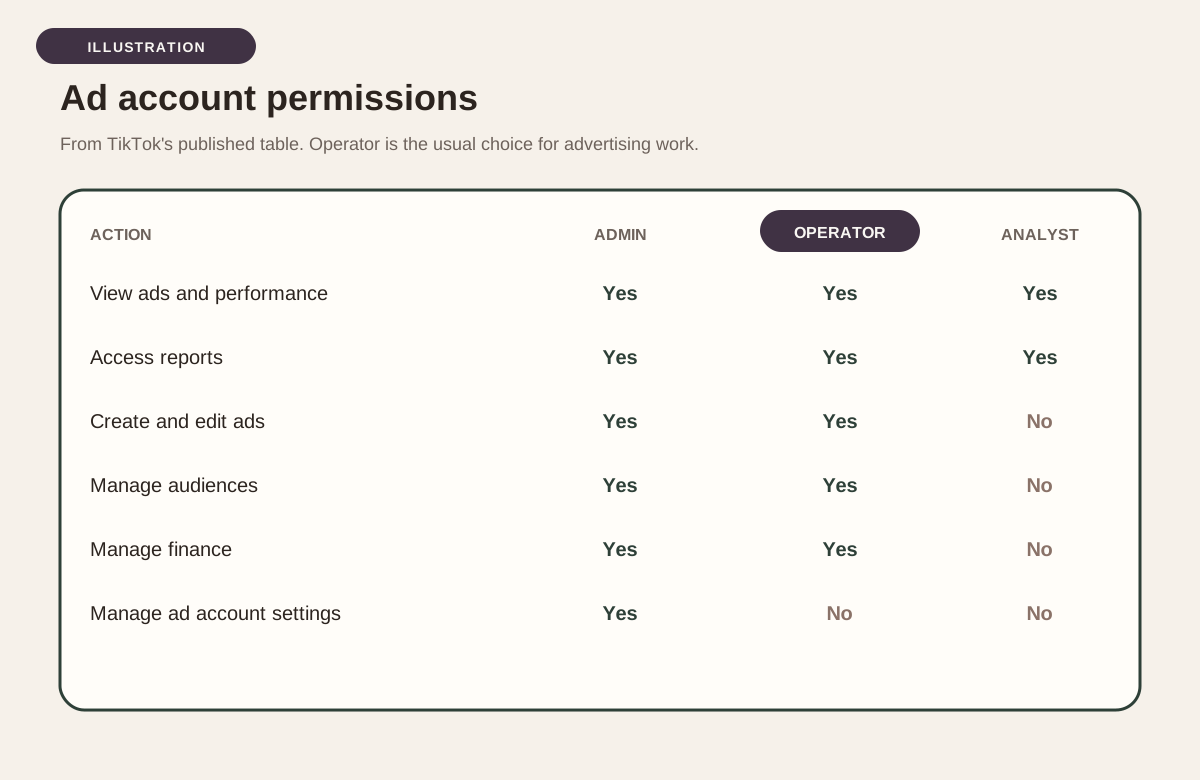
TikTok's March 2026 permissions article publishes this ad account table. Admin, Operator, and Analyst can all view ads and performance and access reports. Admin and Operator can create and edit ads, manage audiences, and manage finance. Analyst cannot. Only Admin can manage ad account settings. Operator cannot. If you want Anata to run campaigns without changing ad account settings, Operator is the match. If you also want Anata to change those settings, choose Admin on the ad account.
If you saved the member invitation without assigning the ad account, you can add it afterward. TikTok's September 2026 article on assigning permissions to an existing member says to log in, open the Users tab, find the member, and click View in the Actions column. At the top right, click Add accounts and assets, select the accounts and assets, set the access level, and click Save. TikTok may ask you to verify your identity again. Only a Business Center Admin can complete this assignment.
Section 04
Add a partner only if Anata gives you a Business Center ID
The partner path is for sharing assets with another Business Center, not for inviting a person by email. TikTok's partner article, updated March 2026, says only a member with Admin access can add a partner, and that you need the partner's Business Center account ID or ad account ID. Anata will supply that ID if this is the path your manager wants. If you have not received an ID, stay on the member invitation above.
To add a partner by Business Center ID, log in, click Partners in the left-hand menu, click Add partner, and enter the ID Anata sent. TikTok may ask whether you want to form a media agency partnership at the Business Center level. Choose Yes or No based on what your manager asked you to confirm, then click Next. Select the accounts and assets this partner should access, set the permissions, and click Next and Confirm. The partner must accept before the shared assets appear in their Business Center. You can also add or change shared assets later from Partners, by selecting the partner, opening the You've shared tab, and clicking Share assets.
Section 05
Add Anata as a TikTok Shop user
Shop access is granted in TikTok Shop Seller Center, not in Business Center. TikTok's US Seller Center access guide, updated May 26, 2026, is written for the shop owner. Only the shop owner account can assign and customize roles. You assign a role to a sub-account. You cannot assign a hand-picked list of permissions. The sub-account receives every permission that sits under the role you chose.
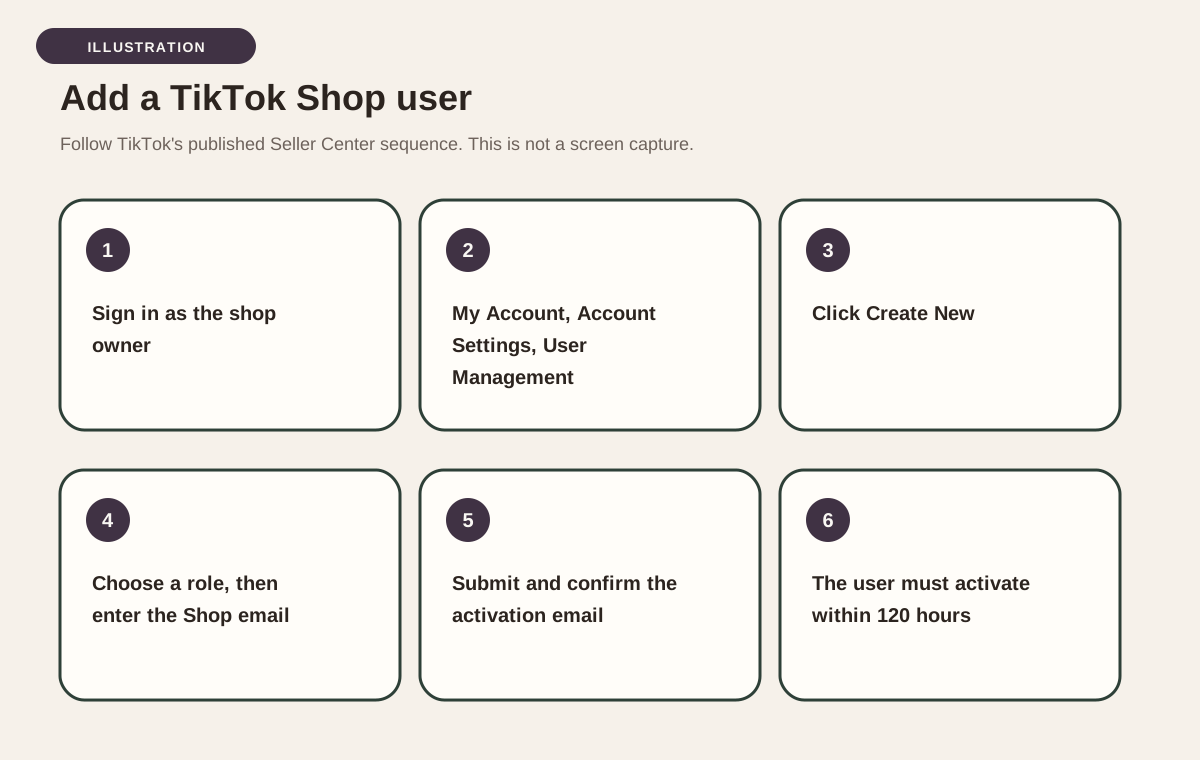
Sign in to Seller Center at seller-us.tiktok.com with the shop owner account. Go to My Account, then Account Settings, then User Management. Click Create New. Choose the role for the user you want to add. If your shop operates in more than one country, TikTok also asks you to choose operating countries, either all countries or a specific country. Type the TikTok Shop email your Anata account manager gave you, choose the default language, and click submit.
TikTok shows a verification notice that an activation email was sent to that address. The invited user must activate the account within 120 hours and can only use Seller Center after that activation. Back on the User Management page, you can see the new user and the activation status. After the account is active, you can edit the user's roles. If you are unsure which default or custom role to pick, ask your Anata account manager before you submit. Choose a role that covers the Seller Center work you want Anata to do, rather than a role that only lets someone view a narrow slice of the shop.
- You are signed in as the shop owner, not as a sub-account.
- You opened My Account, Account Settings, User Management, then Create New.
- You entered the Shop email from your Anata account manager, not the Business Center email.
- You assigned a role that covers the shop work Anata will do.
- If the shop is multi-region, you chose the operating countries Anata should reach.
- The invited user still has time to activate, because the activation window is 120 hours.
Section 06
After you send the invitations
Tell your Anata account manager as soon as both invitations are out, or if TikTok blocked one of them. Anata still has to accept the Business Center invitation and activate the Shop email. Shop activation expires in 120 hours, so do not leave a pending Shop invite sitting into the next week. If a Business Center invite does not arrive, resend it from the Users tab. If you invited the wrong email, do not try to reuse that invitation. Send a new one to the address your manager confirmed.
This email access is how Anata's team works in your ad account and Seller Center with you. It is not the same as connecting TikTok Shop or TikTok Ads inside Anata Intelligence. That product connection is a separate authorization, with its own sign-in rules, and it is covered in the Intelligence guide. Completing the invitations on this page does not by itself authorize that product connection. If your workspace also needs the Intelligence connection, your manager will say so and will point you to that guide.
Questions, answered.
- Should I add Anata as a member or as a partner?
- Use a member invitation when your account manager gives you an email address. Add a partner only if Anata has sent you a Business Center ID or an ad account ID and asked you to use Partners.
- Which email goes in Business Center, and which goes in Seller Center?
- Use the exact addresses your Anata account manager sends you. One email is for Business Center and ads access. A different email may be for TikTok Shop. Do not enter the same address in both places unless your manager told you to.
- Do I need to make Anata a Business Center Admin?
- Usually no. Invite Anata as a Standard member, then assign Operator or Admin on the ad account. Choose Admin on the Business Center itself only if your manager asks Anata to manage members, partners, or Business Center settings.
- What is the difference between Operator and Admin on the ad account?
- Both can view performance, access reports, create and edit ads, manage audiences, and manage finance, according to TikTok's published table. Only Admin can manage ad account settings. Choose Operator for advertising work. Choose Admin if Anata also needs to change those settings.
- Anata did not receive the Business Center invitation. What should I do?
- Open the Users tab, click the email you invited, and click Resend request. Confirm you used the Business Center email your manager sent, then tell your manager that you resent it.
- How long does the TikTok Shop invitation stay valid?
- TikTok says the invited user must activate the account within 120 hours. After that window, the user cannot access Seller Center until a new invitation is completed.
- Can a Seller Center sub-account add Anata?
- No. TikTok says only the shop owner account can assign and customize roles. Sign in as the owner before you open User Management.
- Does this also connect TikTok to Anata Intelligence?
- No. Inviting a member or a Shop user gives Anata's team access inside TikTok. Connecting TikTok inside Anata Intelligence is a separate authorization, described in its own guide.


Sources.
- How to add members to your TikTok Business Center
- About Business Center roles and permissions
- About account and asset level permissions
- How to assign account and asset permissions to an existing member in Business Center
- How to add partners to your Business Center
- How to assign accounts or assets to partners in Business Center
- TikTok Business Center
- Access Management on Seller Center
- TikTok Shop Seller Center
The service this access supports is TikTok Shop management →