
 Anata Intelligence
 Shipping OS
Anata Intelligence
Connect TikTok Shop and TikTok Ads to Anata
By Anata Inc. ·
Reviewed by Anata Inc. ·
TikTok steps follow current Seller Center, Business Center, Ads Manager, and Marketing API documentation. Anata steps follow the Intelligence integration screens. The diagrams are original illustrations, not product screenshots.
The short answer.
TikTok Shop and TikTok Ads are separate TikTok programs. Anata Intelligence connects them with two authorizations, from Settings, then Integrations. Set up the shop in TikTok Shop Seller Center and the ad account in TikTok Ads Manager. Use Business Center when more than one person or ad account needs access. Do not add Anata as a Seller Center sub-account, and do not add Anata as a Business Center partner. Anata does not give you a Business Center ID to paste into Partners.
The primary shop owner authorizes TikTok Shop. The TikTok Business owner, or a Business Center administrator who already has access to the advertiser account, authorizes TikTok Ads. If that sign-in can reach more than one advertiser, choose this brand's accounts and save. Connecting does not create campaigns and does not send creator invitations. Either tile can also say the connection is not open for this workspace yet.
Section 01
Shop and Ads stay separate
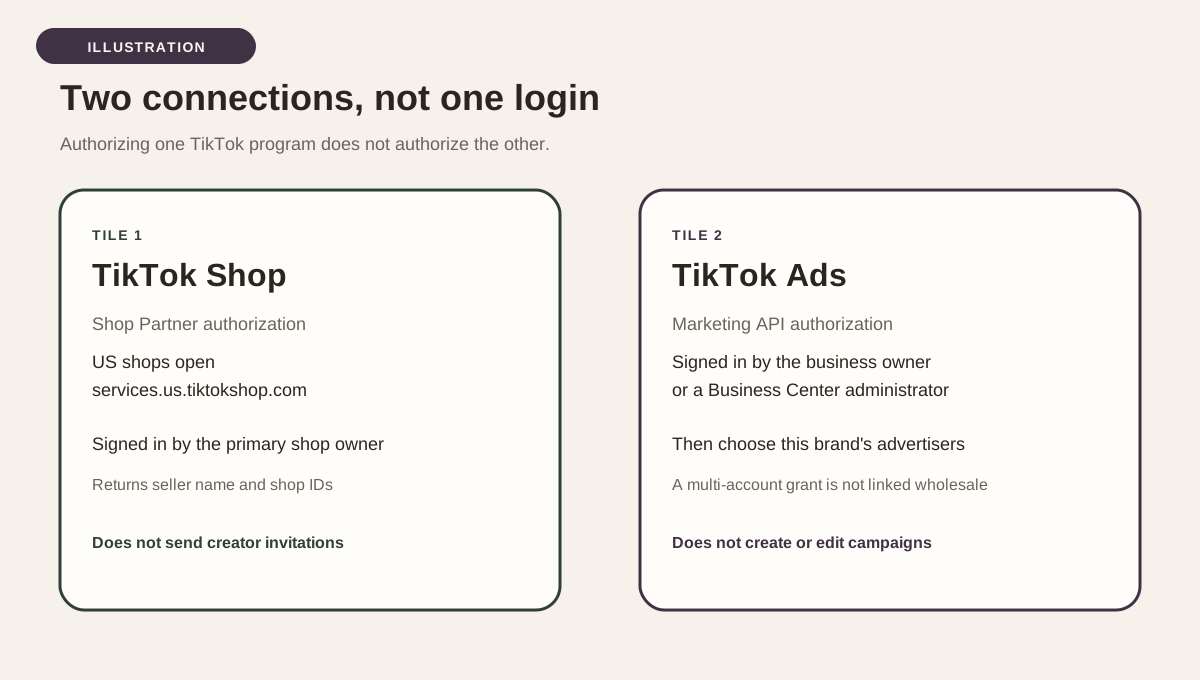
Anata Intelligence shows two integration tiles: TikTok Shop and TikTok Ads. They are not two labels for one login. TikTok Shop uses TikTok's Shop Partner authorization. For a US shop, that authorization opens on services.us.tiktokshop.com. TikTok Ads uses a TikTok Marketing API advertiser authorization, which is a different app, a different consent screen, and a different stored token. Authorizing one does not authorize the other. A brand that sells in the Shop and also buys ads completes both, in either order.
The Shop tile is the seller account. After a successful connection it shows the seller name TikTok returned and the shop IDs on that authorization. The tile's own description covers affiliate GMV, creator attribution, and inviting creators into Target Collaborations. Connecting alone does not send those invitations. The Ads tile is the advertiser accounts. After you connect, you link the advertiser accounts that belong to this workspace. The tile says campaign creation and automated optimization stay off, and that connecting never enables either.
Both tiles can be visible and still refuse to start. If TikTok Shop says a Partner app is being registered, there is no Connect button yet. If TikTok Ads says it has not been enabled for this workspace, Connect will not start. Those messages are about whether Anata has opened the connection for this workspace. They are not a missing click inside Seller Center. Finish the TikTok setup on this page, then use whichever tile is actually open. If Connect returns the message that the connection is not yet available for new software subscriptions, the Shop authorization is closed for that subscription even when the button was visible.
Section 02
Set up TikTok Shop in Seller Center
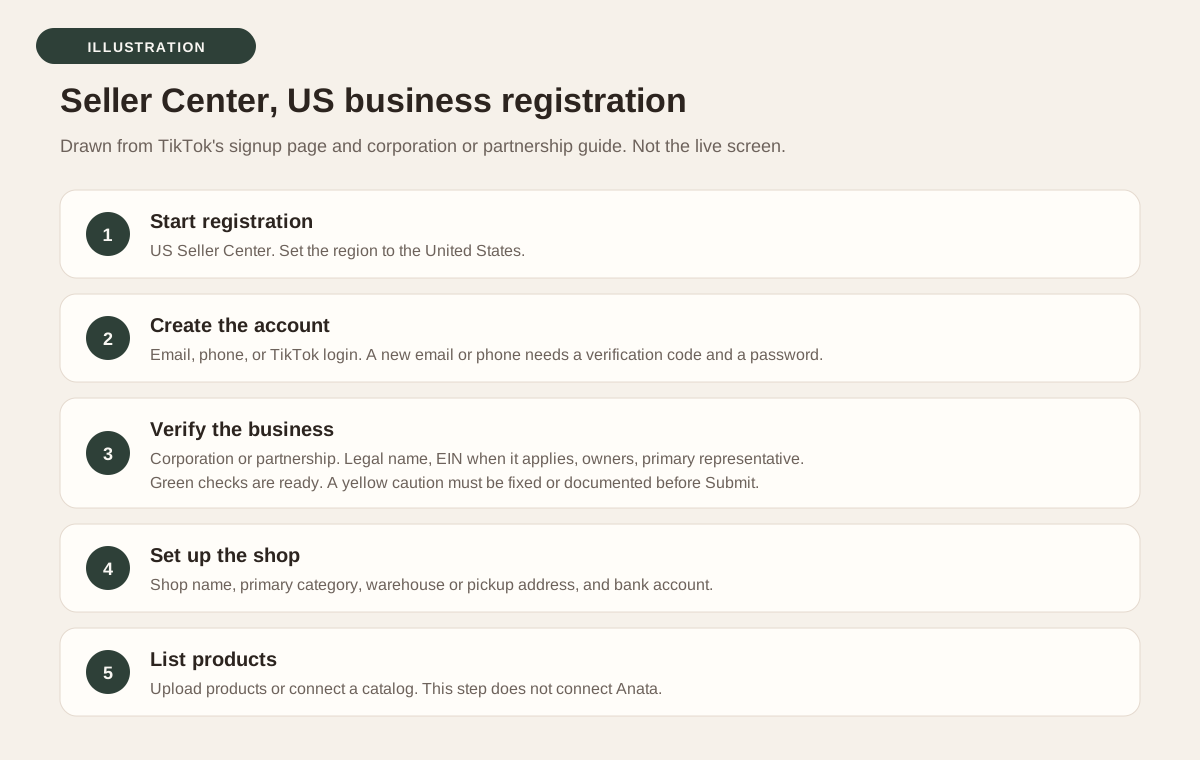
This section follows TikTok's US Seller Center. A shop in another market uses that market's Seller Center. It also would not match the US authorization host Anata uses unless that workspace is configured for another market. Start at TikTok's US registration page. TikTok's signup page describes five moves: start registration, create the account, verify the business or the person, set up the shop, and list products. Account creation can use an email, a phone number, a TikTok account, or a third-party login. TikTok's corporation and partnership guide says a TikTok login ends with Authorize, and an email or phone signup uses a verification code and a password.
A brand should register as a business rather than as an individual selling under a personal name. TikTok's corporation and partnership guide, updated September 18, 2026, requires a primary business address in the United States, a phone number and email that are not already used to open another shop, and owners and representatives who are at least 18. Governments, politicians, and political parties cannot become sellers. The form asks for the legal business name, the registered business address, the EIN when it applies, ultimate beneficial owner details, and the primary representative, including the last four digits of an SSN or an ITIN. TikTok names a US passport or passport card, a US driver license, a state ID, or a permanent resident card. Documents must be unexpired, fully visible, unaltered, and under 10 MB, in PDF, JPEG, or PNG. The legal name and date of birth must match the ID. The residential address must match the proof of address.
On the review page, TikTok shows a green check when a primary-representative field is verified and a yellow caution when it is not. Submit stays unavailable until legal name, date of birth, residential address, and SSN are verified or the required documents are attached. Then set the shop name shoppers will see. TikTok allows letters, numbers, and special characters, rejects a name made only of numbers or only of special characters, and says not to use flagship or official in the name. Choose a primary product category for registration. TikTok says that choice does not limit later selling. The signup page also lists a warehouse or pickup address and a linked bank account as part of shop setup. If the phone or email is already registered, TikTok's guide says the account already exists for a TikTok Shop or for TikTok for Business. Log in to that account, or change the contact. Do not expect a second shop on a contact TikTok has already used.
Listing products, or connecting a catalog, is still Seller Center work. It does not create the Anata authorization. Keep the owner login available for the later Connect step. TikTok lets that owner add sub-accounts for staff, but those sub-accounts are not the account that authorizes Anata.
Section 03
Set up Ads Manager and Business Center
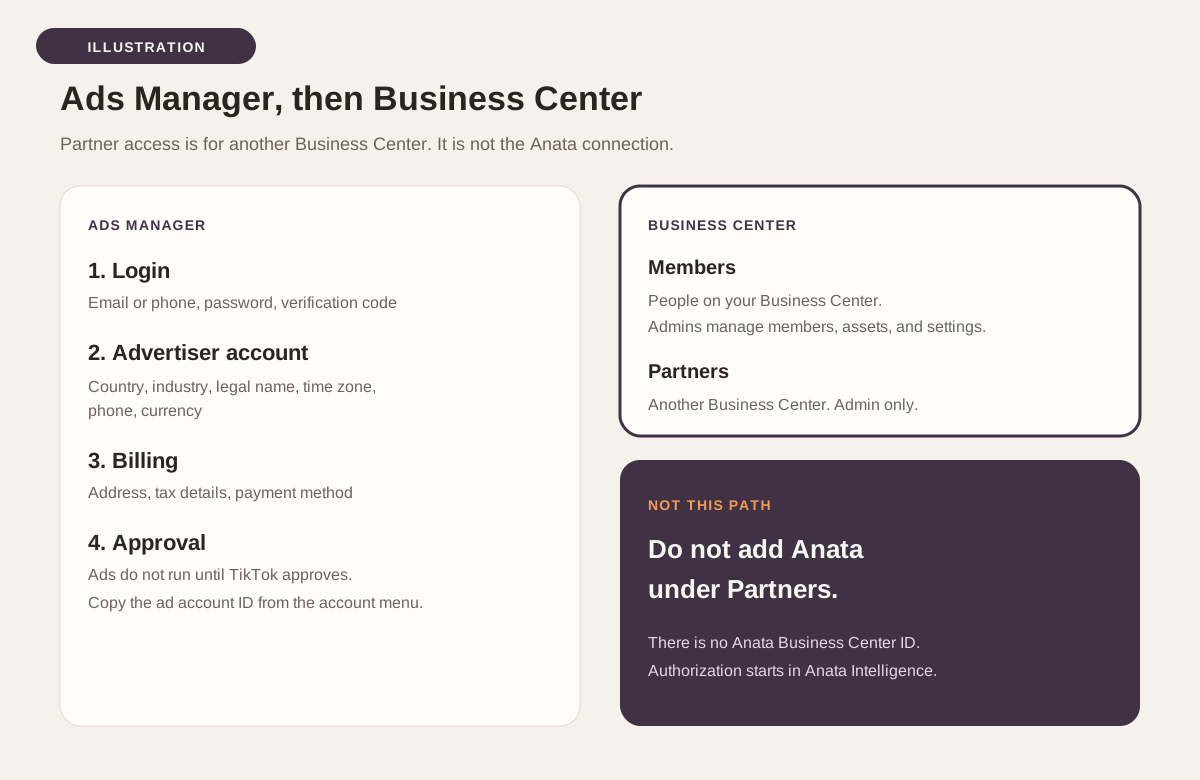
TikTok's Ads Manager help article, updated June 2026, is written for self-serve accounts. Open the Advertising on TikTok signup page, create a login with an email or phone number and a password, agree to the terms, and enter the verification code TikTok sends. Creating the advertiser account asks for country or region, industry, legal business name, time zone, phone number, and currency. TikTok says the legal name is used to verify the business, and a name that does not match the actual business can keep the account from being approved. Then provide the billing address and tax details your country requires, choose a payment method, and go to Ads Manager. TikTok submits the ad account for approval. You can build a campaign before approval, but ads do not run until the account is approved. TikTok says most reviews take less than 24 hours. The ad account ID is in the account-name menu at the top of Ads Manager. Status is under Tools, Settings, Account setup, My account, Basic information.
When more than one person or more than one ad account will be used, TikTok points self-serve advertisers to Business Center. TikTok's Business Center site says to register at business.tiktok.com with a TikTok for Business user, set up two or more admins, and invite teams and partners. Members are people inside your Business Center. TikTok says you assign their access to the assets they will work on, and that admins can add or remove members, manage assets, and update settings. Finance permissions are an additional assignment for the person who handles billing and payment. Partners are other Business Centers, not individual staff logins. TikTok's March 2026 partner article says only a member with Admin access can add a partner, and that you need the partner's Business Center account ID or ad account ID. The path is Partners, Add partner, enter the ID, choose accounts and assets, set permissions, then confirm. The partner must accept before those shared assets appear in their Business Center.
TikTok also documents three ad account permission levels an admin can assign: Admin, Operator, and Analyst. The March 2026 permissions article lists actions that include viewing ads and performance, access to reports, creating and editing ads, managing audiences, managing finance, and managing ad account settings. Use the table on that page for which level includes which action. This guide does not reprint the matrix. Those levels are how you share an ad account with your team or with an agency Business Center. They are not how you connect Anata. Adding a partner does not create the Anata connection, and Anata does not publish a Business Center ID to paste into that form.
Section 04
The access to grant
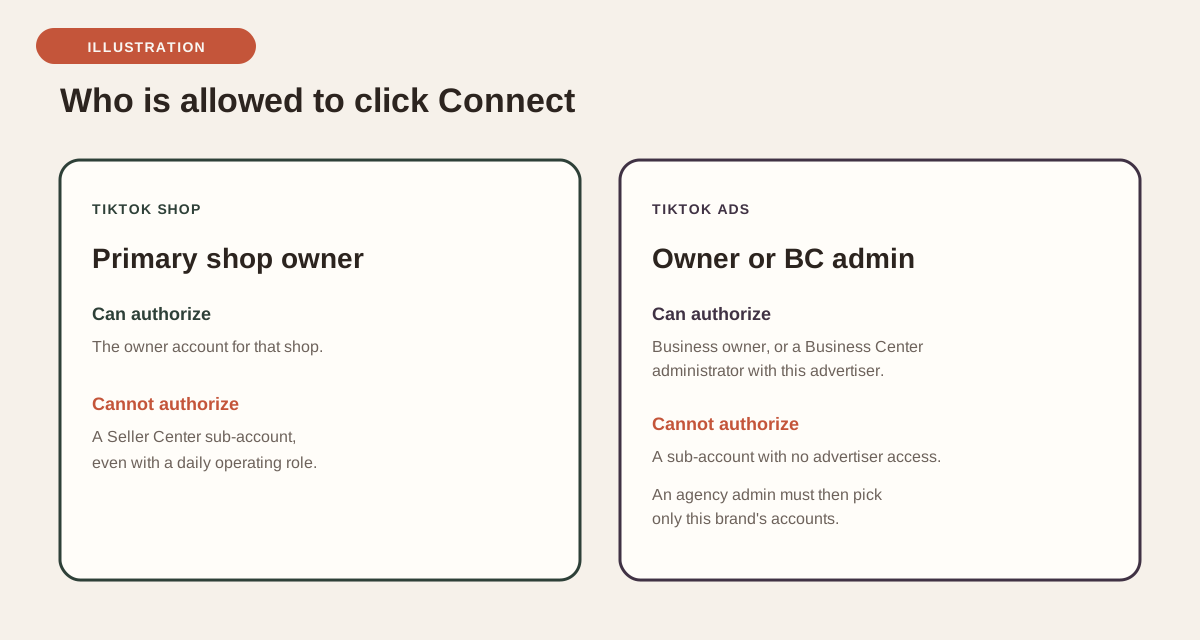
Grant access by completing the right TikTok sign-in from Anata, not by creating a user named Anata. For TikTok Shop, the connection panel says to sign in with the primary TikTok Shop owner account, and that sub-accounts cannot authorize the connection. Seller Center is built the same way around the owner: TikTok's access guide says only the shop owner account can assign and customize roles, and a sub-account receives roles rather than a hand-picked permission list. Adding someone under My Account, Account Settings, User Management does not authorize the Shop Partner app.
For TikTok Ads, the connection panel says to sign in with the TikTok Business owner, or a Business Center administrator who has explicit access to the advertiser account. A sub-account without advertiser permission cannot authorize it. If an agency administrator signs in, TikTok shares every advertiser that person can reach. Anata does not link that whole grant. You choose the accounts for this workspace, unless the grant contains exactly one advertiser, which is linked on its own. In Anata, Connect, a later advertiser change, and Disconnect require permission to manage integrations. Someone without that permission can view status and cannot start the authorization.
- TikTok Shop: the primary shop owner signs in. A Seller Center sub-account cannot authorize this connection.
- TikTok Shop: use the US shop when Anata is on its US default, so the browser opens services.us.tiktokshop.com.
- TikTok Shop: read the consent screen before you confirm. Anata's TikTok Shop connection is built for these scope keys: seller.authorization.info, seller.affiliate_collaboration.write, seller.order.info, seller.product.basic, and seller.finance.info. TikTok may show its own labels for those scopes.
- TikTok Ads: the TikTok Business owner signs in, or a Business Center administrator who can already reach this advertiser.
- TikTok Ads: do not add Anata under Partners. There is no Anata Business Center ID for this step.
- TikTok Ads: on TikTok's permission screen, expect reporting access. Anata's approved Marketing API app is documented to request Consolidated Report and read access to ad account information. Stop if the screen asks to create or update campaigns and nobody told you to expect that.
- TikTok Ads: when Anata shows an advertiser picker, save only this brand's accounts. Leave every other advertiser unchecked.
- Anata Intelligence: the person who clicks Connect has permission to manage integrations.
- Both: finish TikTok's confirmation in one sitting. The Shop code is single-use, and the Shop client treats it as valid for about 30 minutes. TikTok's Marketing API documentation says the ads code is valid for one hour and can be used once. You do not paste the code. If you return without a Connected state, start Connect again.
Section 05
Connect each account in Anata Intelligence
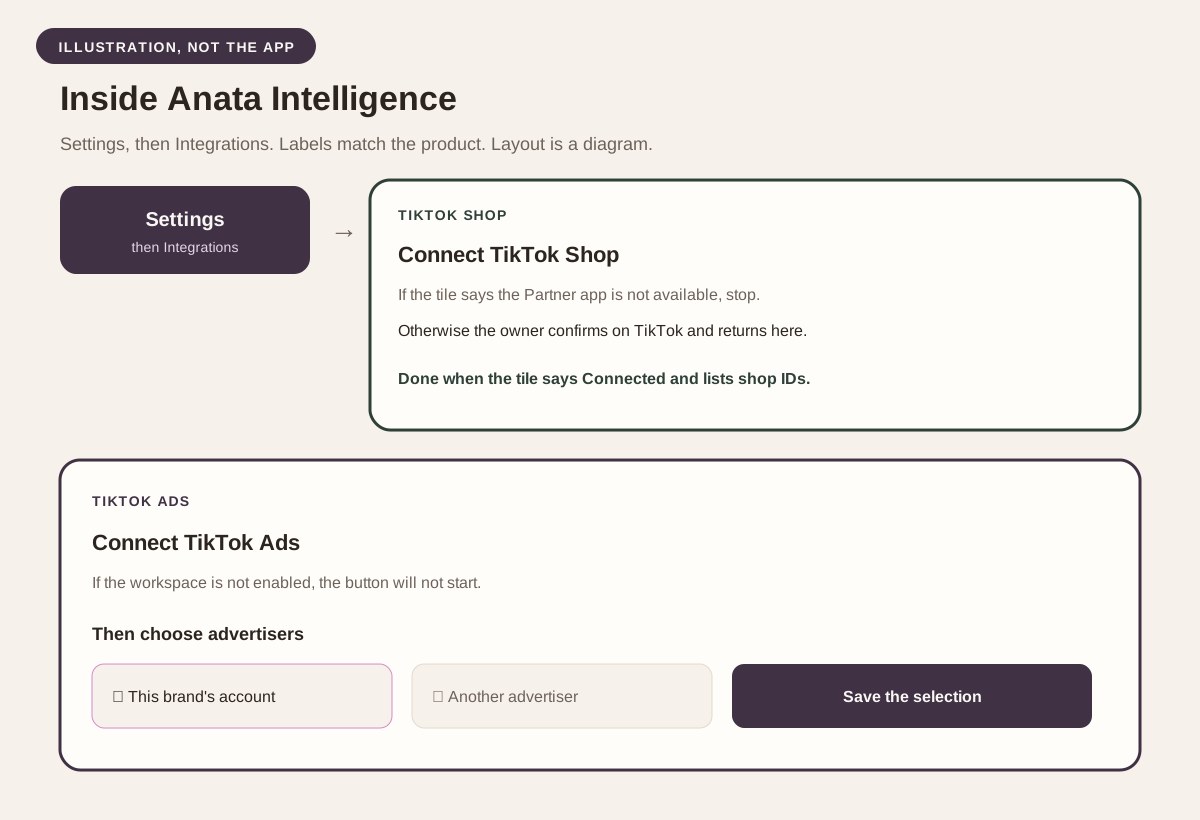
Open the brand's workspace in Anata Intelligence. Go to Settings, then Integrations. Open TikTok Shop or TikTok Ads first. The order does not matter, because the tokens are stored separately. Use Connect on a tile that is open. If the Shop tile says it is not yet available because a TikTok Shop Partner app is being registered, stop. There is nothing to authorize until that app is connectable. If the Ads tile says TikTok Ads is ready for a controlled pilot but has not been enabled for this workspace, stop and ask Anata to enable the workspace.
On TikTok Shop, Connect sends the browser to TikTok's service authorization for the configured market. The default market is the United States, so the host is services.us.tiktokshop.com. Sign in as the primary shop owner, review the permissions, and confirm. Anata exchanges the code on the server and returns you to Settings, Integrations. A connected shop shows Connected, the seller name when TikTok provided one, the connection date, and the authorized shop IDs. If TikTok returns no shops, the panel says so and tells you to authorize again if you expected shops. The access token renews on its own, and the panel shows the date the current token is valid until. Reading is available from this connection. Sending creator invitations stays off until outreach is armed separately for the workspace.
On TikTok Ads, Connect opens TikTok's advertiser authorization. TikTok's Marketing API guide says the advertiser sees the permissions selected for the developer app, agrees to the Platform Service Agreement, clicks Confirm, requests a verification code sent to the email on the ad account, and confirms that code. A previous verification for the same developer app can remain valid for 48 hours. A different app requires a new code. You then return to Integrations. If the grant covers more than one advertiser and none of an earlier selection still applies, the panel says to choose an advertiser account and states that nothing is linked until you save. Search by account name or ID, check this brand's accounts, and save. The button names the account when one is selected, or the count when several are selected. Accounts you leave unchecked stay unlinked. You can reopen the list with Change advertiser accounts. The safeguards line should still say campaign creation is disabled and automated optimization is disabled.
Section 06
What a finished connection does
A finished Shop connection is a stored authorization for that workspace, with the seller name and shop IDs TikTok returned. A finished Ads connection is a stored authorization plus the advertiser IDs you linked. Anata uses only those linked IDs. A grant that can see many advertisers does not become this workspace's account list. Disconnect removes that workspace's stored TikTok Shop token or TikTok Ads token. It does not delete the shop, the ad account, or a Business Center partner relationship, because this flow does not create one.
Do not expect this step to open a TikTok campaign editor, to change a budget, or to send creator invitations. Campaign creation and automation are separate controls, and both global switches default to off. Connecting does not arm them. Order, product, and settlement reads exist in the Shop client as a separate commerce path. They are not what the Connect button turns on, and this guide does not describe a TikTok sales or ads report page inside Anata Intelligence. Seller Center remains where the shop is managed. Ads Manager remains where ads are built. Anata Intelligence is where the brand authorizes the two connections and, for ads, chooses which advertiser accounts belong to the workspace.
Questions, answered.
- The TikTok Shop tile says it is not yet available. Did I miss a Seller Center step?
- No. That message means Anata's Shop Partner app is not ready for connections yet. You can still finish Seller Center. The Connect button appears after the app is connectable.
- TikTok Ads says it has not been enabled for this workspace. What do I do?
- The ads authorization is opened workspace by workspace. Ask Anata to enable this workspace. Until then, Connect will not start, even if Ads Manager and Business Center are already set up.
- Connect says this connection is not yet available for new software subscriptions. What does that mean?
- TikTok Shop returns that message when a new subscription is not allowed to start the Shop connection. Existing Shop connections can remain. Adding a Business Center partner does not change it.
- I added a user in Seller Center and Anata still says Not connected. Why?
- A Seller Center sub-account cannot authorize the Shop connection. Use the primary owner account on the Connect button in Anata Intelligence.
- I added a partner in Business Center and nothing connected. Why?
- Partner access shares assets with another Business Center. Anata's ads connection is the Marketing API authorization started from Integrations. There is no partner ID to enter for Anata.
- The advertiser list is empty, or it lists accounts that are not this brand. What should I select?
- An empty list means this authorization does not cover any advertiser accounts. Ask a Business Center admin to give the signing-in user access to the advertiser, then connect again. A long list means that user can reach those advertisers. Check only this brand's accounts and save. The others stay unlinked.
- Seller Center says the account already exists. Can I open another shop on the same email?
- TikTok's corporation and partnership guide says that error means the phone or email is already registered for a TikTok Shop account or for TikTok for Business. Log in to the existing account, or use a phone or email that is not already registered.
- I returned to Anata and the tile is still not connected. Should I refresh the TikTok tab?
- Finish TikTok's confirmation in one sitting, including the ads email code when TikTok asks for it. If consent was denied or the code exchange failed, start again from the same Connect button. Do not reuse an old TikTok tab. The authorization code cannot be reused.
- Will Anata create or edit campaigns after I connect?
- No. The Ads panel keeps campaign creation and automated optimization disabled. Connecting does not enable them. Those actions depend on separate controls that default to off.
- Is this the same thing as TikTok Shop management?
- No. TikTok Shop management is an operating service. This guide is the Seller Center and Ads Manager setup, plus the two authorizations inside Anata Intelligence. The shop is still managed in Seller Center.
Sources.
- Sign up for TikTok Shop
- How to register as a Corporation or Partnership
- Registering for TikTok Shop
- Access Management on Seller Center
- How to set up a TikTok Ads Manager account
- TikTok Business Center
- How to add partners to your Business Center
- About account and asset level permissions
- How to assign accounts or assets to partners in Business Center
- Marketing API Authorization
- API Reference Overview
- TikTok Shop Seller Center
The signed-in connection lives in the workspace. The public product page is Anata Intelligence →